· guides · 6 min read
What Is Pain Mapping? A Complete Guide to Visual Pain Communication
Pain mapping is a method of recording exactly where and how intensely you feel pain on a body diagram. Learn how digital 3D pain maps help patients communicate more clearly with doctors.
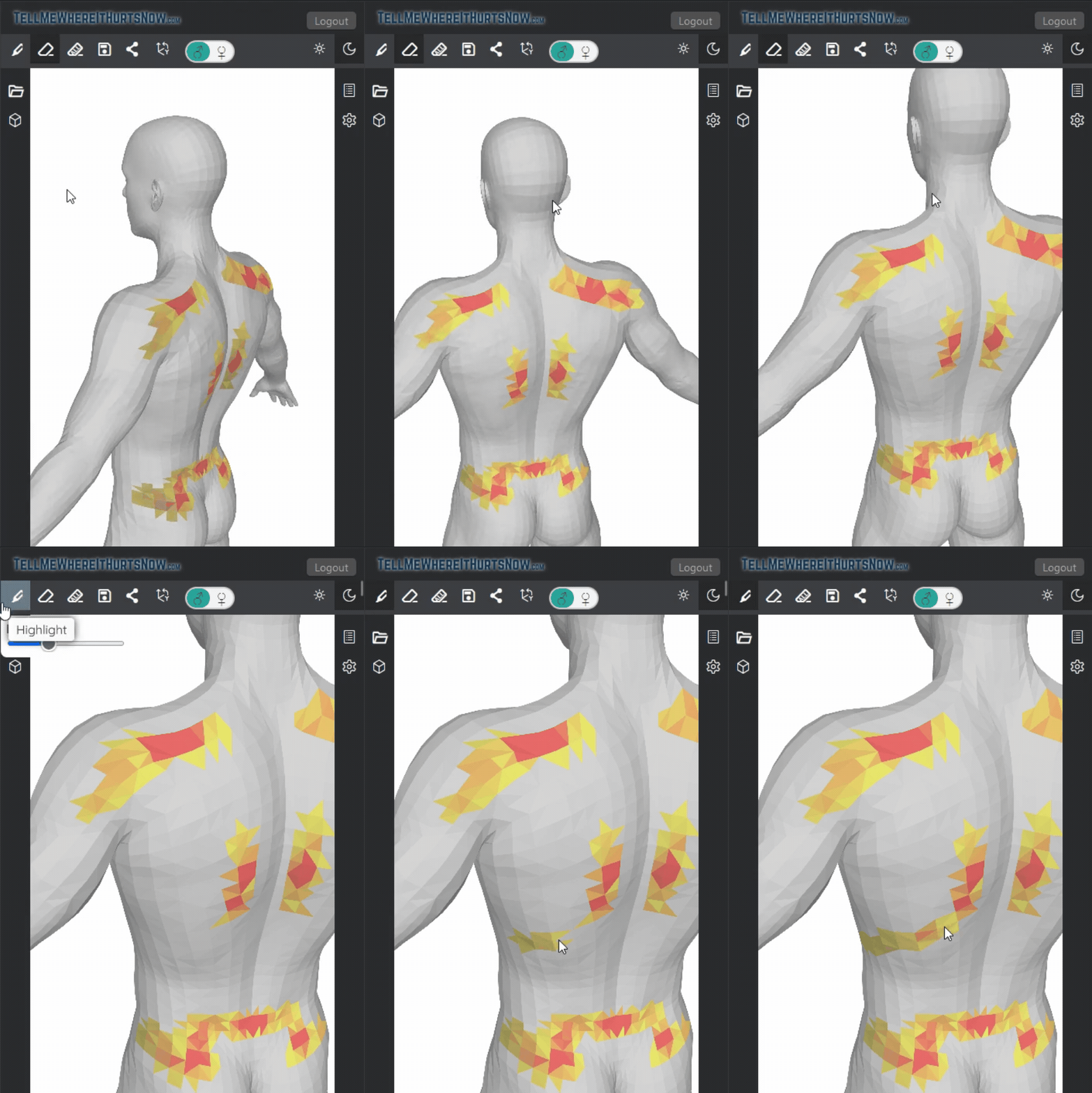
Pain is personal, invisible, and notoriously hard to describe. When a doctor asks “where does it hurt?”, most patients struggle to convey the full picture — especially when pain is widespread, overlapping, or changes day to day.
Pain mapping solves this by giving patients a visual way to record, rate, and share their pain. Instead of fumbling for words, you point to a body model, mark the areas that hurt, rate their intensity, and hand the result to your doctor.
What Is a Pain Map?
A pain map is a visual record of pain locations and severity overlaid on a representation of the human body. Traditional paper-based versions have been used in clinics for decades — the patient shades in areas on a printed body outline and the clinician interprets the result.
Digital pain mapping takes this further. With tools like TellMeWhereItHurtsNow.com, patients interact with a 3D body model, tapping or clicking to mark exactly where it hurts and using a color-coded scale to indicate intensity. The result is a shareable, storable record that’s far more precise than words alone.
Why Traditional Pain Descriptions Fall Short
Consider how most doctor visits go:
- “It hurts here… kind of.” Vague gestures at a general area.
- “It’s about a 7.” A number on the 0–10 scale with no spatial context.
- “It comes and goes.” No history, no pattern, no timeline.
Studies show that patients and doctors frequently disagree on pain location and severity. Pain maps reduce this gap by providing an objective, visual reference that both patient and doctor can point to.
The limitations of words
- Pain can radiate, making it hard to pin down
- Multiple pain areas are difficult to describe simultaneously
- Pain intensity changes throughout the day
- Stress and anxiety during appointments can make patients forget details
- Language barriers compound the problem
How Digital Pain Mapping Works
Modern pain mapping tools replace paper diagrams with interactive 3D models. Here’s how it works with TellMeWhereItHurtsNow.com:
Step 1: Point
Open the web app on any device — phone, tablet, or computer. You’ll see a detailed 3D human body model that you can rotate, zoom, and tap. Click or tap anywhere on the model to mark a pain area. The 3D model lets you mark locations that flat diagrams miss, like the exact spot between your shoulder blades or the side of your knee.
Step 2: Rate
Once you’ve marked an area, use the color-coded pain scale to indicate intensity. Colors range from mild (yellow-green) to severe (deep red), giving your doctor an instant visual read on what hurts most.
Step 3: Share
When your pain map is complete, share it with your doctor via a secure link — they can view it on any device without creating an account. You can also export a PDF for your medical records, insurance paperwork, or to bring to an in-person visit.
The entire process takes about 30 seconds.
Who Benefits from Pain Mapping?
Chronic pain patients
If you live with ongoing pain — fibromyalgia, arthritis, neuropathy, back problems — you know that describing it gets exhausting. Pain maps let you document changes over time, building a visual history that shows your doctor how your condition is evolving.
Pre-appointment preparation
Creating a pain map before your doctor visit means you won’t forget to mention an area that’s been bothering you. It also saves appointment time: instead of spending the first 5 minutes trying to explain your pain verbally, your doctor can review your map and jump straight to questions and examination.
Emergency and urgent care visits
When you’re in acute pain at an ER or urgent care, you may not be in the best state to articulate your symptoms clearly. A pain map created on your phone in the waiting room gives the triage team a precise, visual summary.
Telehealth consultations
Remote appointments make physical examination impossible. A pain map bridges the gap by giving your telemedicine doctor a detailed visual reference, making virtual visits more productive.
Physical therapy and rehabilitation
Tracking pain locations between PT sessions helps your therapist see what’s improving and what needs more attention. Chronological pain maps serve as a progress log.
Clinics and healthcare providers
Practices can embed pain mapping buttons in intake forms, emails, or kiosk displays. Patients complete their pain map before the appointment, and results appear in the clinic’s dashboard — organized by patient and date, ready for review during the visit.
When to Use Pain Mapping
- Before any doctor appointment — arrive with a clear visual record
- After a new injury — document the initial pain pattern for comparison
- During a flare-up — capture what’s happening in real time
- Weekly or monthly — build a pain diary that reveals patterns over time
- Before and after treatment — show whether a medication, procedure, or exercise is working
- When switching doctors — give your new provider instant context on your pain history
Digital vs. Paper Pain Maps
| Feature | Paper diagram | Digital 3D pain map |
|---|---|---|
| Precision | Limited to flat outline | Full 3D — mark any angle |
| Intensity recording | Shading/handwriting | Color-coded scale |
| Shareability | Scan or photocopy | Instant link or PDF |
| History tracking | Stack of papers | Chronological digital records |
| Accessibility | In-office only | Any device, anywhere |
| Doctor review | During appointment | Before, during, or after |
Pain Mapping and Pain Scales: Complementary Tools
Pain maps don’t replace the standard 0–10 pain scale — they enhance it. While a pain scale captures overall severity, a pain map adds the critical spatial dimension: where that pain lives in your body and how different areas compare in intensity.
Together, they give healthcare providers a much fuller picture than either tool alone.
Getting Started
Creating your first pain map is free and takes 30 seconds:
- Visit TellMeWhereItHurtsNow.com
- Tap on the 3D body model to mark where it hurts
- Set the intensity for each area
- Share the link with your doctor or export a PDF
No download, no credit card, no account required to try.
Frequently Asked Questions
Is pain mapping clinically validated? Body diagrams and pain drawings have been used in clinical settings since the 1940s. Digital pain mapping modernizes this established practice with better precision, shareability, and record-keeping.
Do I need to create an account? You can try the tool without an account. Creating a free account lets you save up to 30 pain records and 15 shareable pain maps.
Can my doctor see my pain map? Yes. You share a secure link that your doctor can open on any device. They don’t need an account or any special software.
Does it work on mobile? Yes. The 3D model works on phones, tablets, laptops, and desktops — any modern web browser.
How is my data protected? All data is stored securely with encryption. Pain maps are only accessible via your private account or through links you choose to share.
Can I track pain over time? Yes. Save a new pain map at each flare-up or on a regular schedule. Your chronological records show how your pain pattern evolves over days, weeks, or months.